
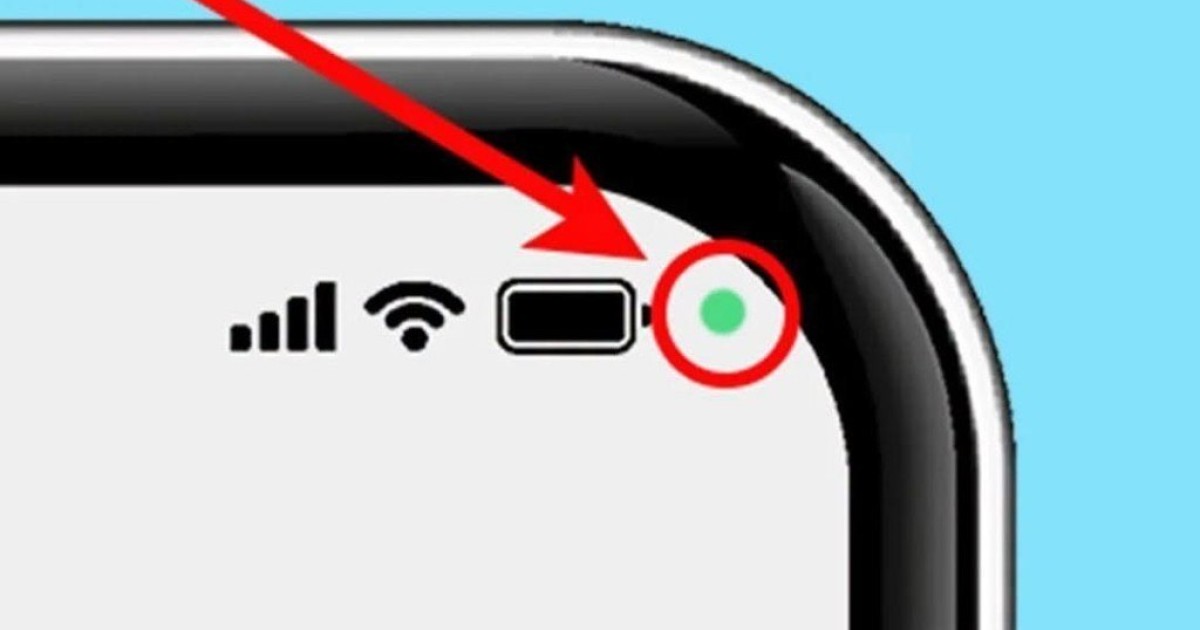
Understanding the Green Dot on Your Android Phone
If you’ve recently noticed a green dot appearing in the upper right corner of your Android phone, you’re not alone. Many users are perplexed by this simple yet intriguing icon. While Android devices borrow a variety of features from their competitors, the green dot serves as an important notification symbol. In this article, we will explore the significance of the green dot, what features it indicates, and how you can manage your device’s privacy settings effectively.
What Does the Green Dot Mean on Android Devices?
The green dot on your Android phone is a visual indicator that reflects when your device’s camera or microphone is actively in use. This feature was introduced to enhance user privacy and awareness, allowing you to easily identify when an app may be accessing sensitive data.
How It Works
When an application utilizes the camera or microphone, the green dot will appear on your screen as a reminder. This is similar to how some features work on other smartphones, promoting transparency and helping users protect their information.
Why Is the Green Dot Important for Privacy?
With the increasing concerns about privacy and data security, the green dot serves multiple purposes that help to keep users informed:
- Awareness: The green dot reminds you when an app is using your camera or microphone, making you aware of potential surveillance.
- Control: Users can exercise more control by monitoring which apps access their sensitive features.
- Transparency: This feature promotes transparency in app permissions, which is vital in today’s digital world.
Common Scenarios When You Might See the Green Dot
There are several common scenarios where the green dot may appear on your Android phone:
1. Using Video Calling Apps
When you engage in video calls through apps like Zoom, Skype, or Google Meet, the green dot will be visible. This indicates that the app is using your device’s camera and microphone for the call.
2. Recording Audio or Video
Several applications, such as voice recorders or camera apps, utilize the microphone or camera to capture audio or video content. Whenever these functionalities are activated, you will notice the green dot.
3. Voice Assistant Activation
Using voice-activated assistants like Google Assistant will also trigger the green dot. This indicates that your microphone is turned on and listening for your commands.
4. Social Media Engagement
Apps like Instagram and Snapchat often allow users to post stories or live videos, which will also activate the green dot. When these features are in use, the green dot appears as a reminder of the active usage of your camera or microphone.
How to Manage App Permissions on Your Android Phone
To ensure you have control over which applications can access your camera or microphone, you can manage app permissions directly through your Android settings. Here’s how:
Step 1: Access Your Settings
Open the Settings app on your Android device, typically represented by a gear icon.
Step 2: Navigate to Privacy Settings
Look for the Privacy section in the settings menu. This area manages permissions related to sensitive features like your camera and microphone.
Step 3: Review App Permissions
In the Privacy section, you will find a list of permissions. Select Camera or Microphone to see which apps have access to these features.
Step 4: Modify Permissions
You can toggle permissions on or off for each app, ensuring that only the applications you trust have access to your camera and microphone.
Addressing Concerns about Privacy and Security
While the green dot provides a clear indication of when your camera or microphone is in use, it is essential to take additional steps to protect your privacy:
- Regularly Check Permissions: Regularly review the permissions granted to apps and revoke access from any application you don’t trust.
- Uninstall Suspicious Apps: If you come across apps that seem unnecessary or overly invasive, consider uninstalling them.
- Update Your Device: Keeping your Android device updated ensures you have the latest security features and patches to protect your data.
Conclusion
The green dot on your Android phone is an important feature designed to protect your privacy by alerting you when your camera or microphone is in use. Understanding its significance can help you manage your device effectively and make informed decisions about app permissions. By regularly checking and updating your settings, you can ensure a more secure experience on your Android device. Stay vigilant and keep your data safe!
